Register a New Backpack
Backpack Directory
Registering a new backpack is as simple as creating a JSON file, however they need to be placed in a specific directory for Backpacked to detect them. In your data directory, create the directory structure: data/<namespace>/backpacked/.
If you downloaded the Base Addon Pack from the Assets page. The directory should have already be created, just make sure to change the example namespace as mentioned in the Getting Started section.
If you are developing a mod or integrating into an existing mod, create the structure from your src/main/resources directory. If you are working in a multiloader project, make sure it is created in your common module.
For clarification, the directory is named backpacked and not backpack. This is intentional, and not a typo.
Registering
In the backpack directory data/<namespace>/backpacked/, create a new file and call it <your_backpack_name>.json. You may only use the charaters a-z and _ as the name of your backpack. The name is also the ID of the backpack.
Once you complete your addon, you can force unlock your backpack in-game using the command:
/unlockbackpack <namespace>:<your_backpack_name>.
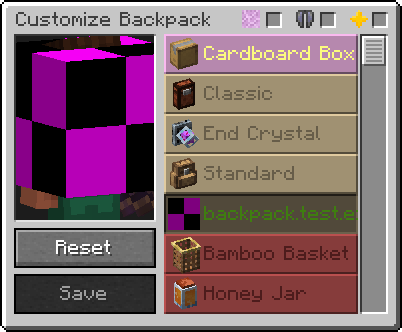
Once you've created the file, open it with your text editor and simply add an empty JSON object {} into the file and save. This is techincally the bare minimum for a Backpacked addon. If you were to load your datapack or mod into the game, Backpacked will detect and load your backpack, it will just have a missing model. It will also be unlocked immediately since you have not created a challenge for it yet. These will be addressed in the next steps.
Dependencies
If the backpack should only be registered if a specific mod is present, the tag mod_loaded with the specified mod_id can be added to the JSON object.
{
    "mod_loaded": "create" // Create must be installed for this backpack to be registered
}
Next Step
It's time to move on to creating the backpack model, and start to bringing your designs into the game!